Adobe Photoshop Patch Tool
Adobe Photoshop Patch Tool Tutorial
Adobe Photoshop Patch Tool
The patch tools remove the unwanted element form the image. The patch retouches image using sampled pixels or pattern. if we removed unwanted part of image then we use patch tools. The patch tool take a sample from image and then mix with other part of image in this way any unwanted element hide. patch works like Healing tool. healing tool is used on small aria and for For larger areas.
Use of Patch Tool
lets take this image

so our goal is remove the black dot from the face. For this purpose we take following steps.
Open the image from which to adjust the problem with patch tool
First create the duplicate the image background layer, click it in the Layers palette and choose Layer > Duplicate Layer. Then click OK.
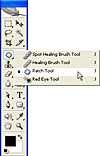
Select the Patch tool from the Tools palette
Select source from option bar.
Pressing left click with patch tool select the area that you want to fix.
Now pressing left click with patch tool drag the selected aria on that aria which is clear and good match with that aria which you want to fix.

Release the mouse button. The original area will be replaced with the area you selected, and the new area will be blended seamlessly into the photo.