MS Excel Tutorial About COUNTBLANK
COUNTBLANK Function In MS Excel
The Excel Countblank function is one of the count function in MS excel. The Countblank function count the blank cell in a given range.
The syntax of the function is :
COUNTBLANK( range )
where Range is the group of cells the function is to search.
For Example if we have a list of student name and the Registration No of the student. if some student in my list have No Reg No. The COUNTIF function tell us that how many student have with out Reg No.
For example in given table

This table show the record of 8 Student. If we want to found that how many student have without Registration Number then we Use COUNTBLANK which count The Blank cell in Given Range in Our case Range is C4:C11
-
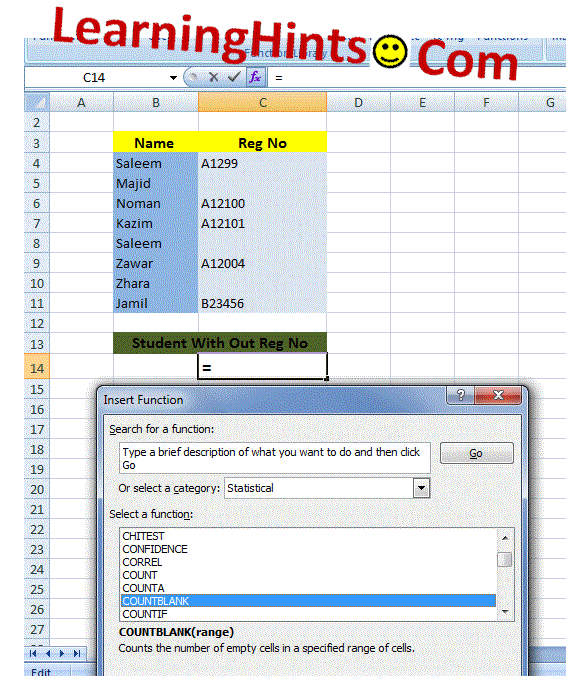
First Select the Cell Where you want to Count . in My case C14
-
Select Formulas Menu and Click on Insert Function and select the Statistical Function and then COUNTBLANK function Form Category List.
-
Select The range and Criteria ( As we discus above). In my case range is C4 to C11.
-
Click on Ok Button.
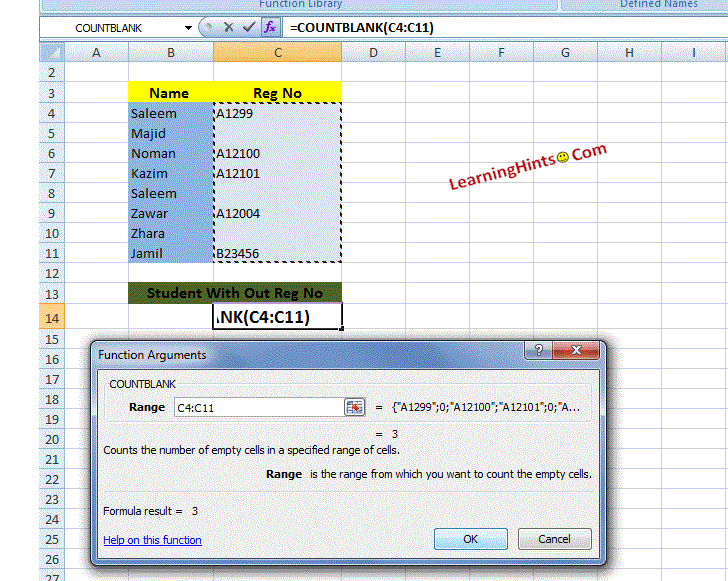
Click on Ok Button.
we also write the function in the Cell where we want to calculate. as given below
= COUNTBLANK (C4 : C11)
where C4:C8 is Our Range.
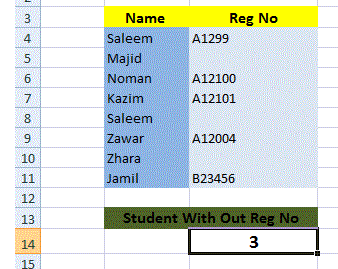
The Final Result is 3. Means that three student have no Reg No: as shown in image:
PMT() Financial Functions
Calculate the Sum of a Range Using AutoSum function
User Define Function (UDF) In Excel
Macros In Excel
Relative and Absolute Cell Reference in MS Excel
Page Setting and printing In MS Excel
Fill In Excel
How we use The Functions in MS Excel
How we Write Excel Formulas
Components of Excel 2007 Environment
Rounding The Numbers MS Excel
SUMIF FUNCTION In MS EXCEL
COUNTIF Function In MS Excel
COUNTBLANK Function In MS Excel
VLOOKUP Function In MS Excel
Pivot Table In MS Excel
Consolidation In MS Excel
Remove Duplicate Value In MS Excel
Convert Excel Data in to a Table