Facebook Profile Editing
Edit your Profile on Facebook
This tutorial guide you step by step process of Editing your profile information.
Logon to facebook with your account.
Click on home Tab fro top.
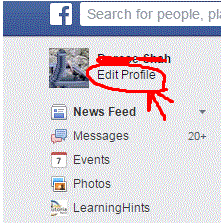
Click Edit Profile option from left panel near your profile picture. (As Shown Below Image)
In next appearing page you have a list of option on left panel of appearing page. (A Shown in Image Below).

Click on Each option one by one and edit your profile information. For example On the Basic Information page, you can edit your current and hometown cities, languages you speak, and more.
When you select any option for example Contact and Basic Information Then you can edit any information by clicking on edit option after the information or you can add more information by clicking Add other option below the information.

Facebook Profile
Hide your Facebook Friends List
News Feed In Facebook
Groups In FaceBook
How We Delete an Album on Facebook
Privacy settings for my photo albums
Change Your Profile Picture on Facebook
Edit your Profile on Facebook
How Facebook Show Description From Your Post
Create a Unique URL for Facebook Page
How we delete all the messages at once at facebook
Delete All Facebook friends at once